Quick start
Run the repository demo or embed the engine in your own service. You need Go 1.26+, PostgreSQL 13+ and a database user allowed to create tables.
Run the demo#
For a local PostgreSQL instance:
docker run -d --name go-bpm-pg -e POSTGRES_PASSWORD=postgres -p 5432:5432 postgres:17Clone and start the service:
git clone https://github.com/nicolas-vp/go-bpm.git
cd go-bpm
createdb -h localhost -U postgres go_bpm
make run
Use a different database with make run GO_BPM_DSN='postgres://user:pass@host:5432/db?sslmode=disable'.
Open http://localhost:8080/ui/. The console and demo diagram labels are in Russian. Select TestDecision, start it with string variables a=foo and b=bar, then open instance history. The result is c="correct foobar". The matched-rules action shows the DMN table and highlights the applicable row.
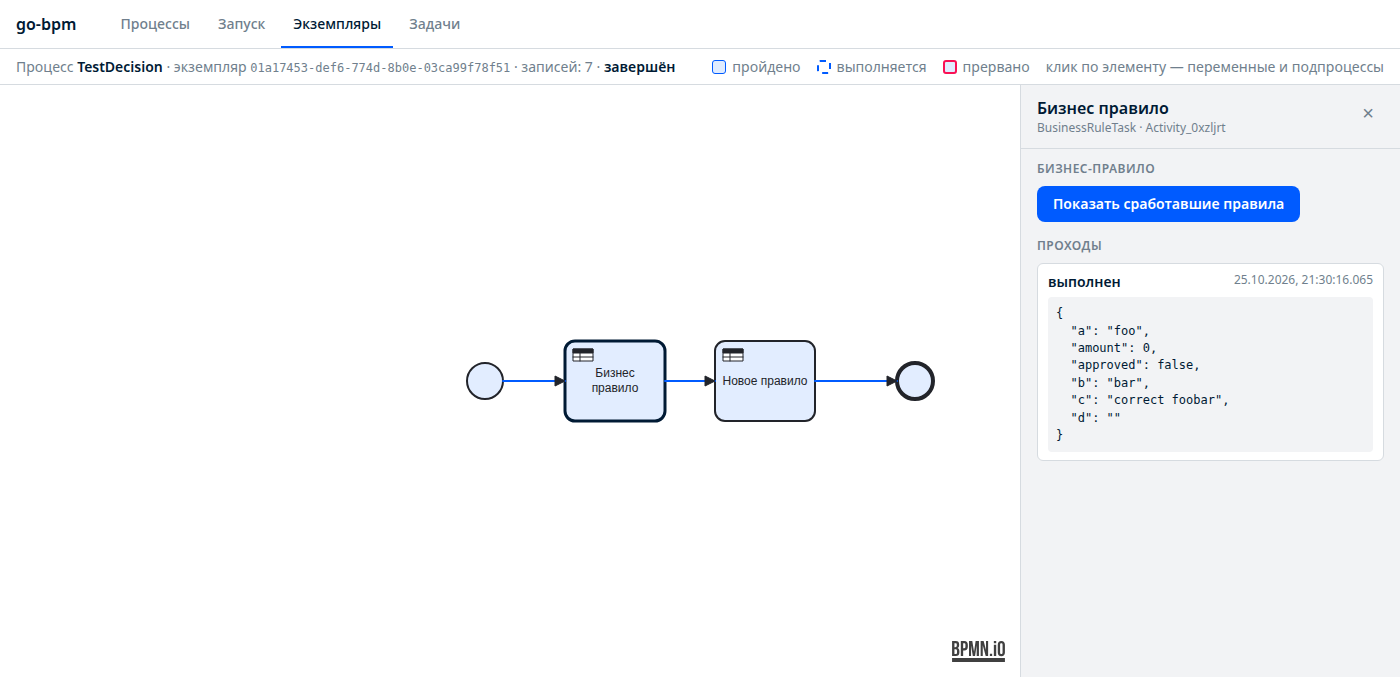
For a human approval, start TestUserTask with initiator=alice. In Tasks, enter user bob and group managers, claim the approval task and complete it with {"approved":true}. With false, the correction task is assigned to alice.
The same operations are available over HTTP:
curl -XPOST localhost:8080/api/v1/processes/TestDecision/instances \
  -d '{"variables":{"a":"foo","b":"bar"},"businessKey":"order-1"}'
curl 'localhost:8080/api/v1/instances?processName=TestDecision'
# Replace INSTANCE_ID with the returned id:
curl localhost:8080/api/v1/instances/INSTANCE_ID/history
See the demo walkthrough for each process.
Build your own service#
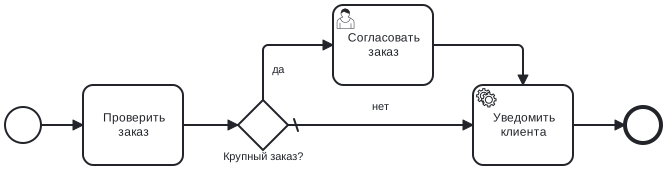
Create an orders service: validate an order, ask a manager to approve large orders and notify the customer.
1. Module and dependencies#
mkdir orders
cd orders
go mod init example.com/orders
go get github.com/nicolas-vp/go-bpm@latest
go get -tool github.com/nicolas-vp/go-bpm/cmd/go-bpm-gen@latest
The tool directive in go.mod pins the generator. Keep it at the same version as the engine.
2. Generation directive#
Create internal/gen/generate.go:
package gen

//go:generate go tool go-bpm-gen
The generator reads process/ and writes internal/bpmgen/, relative to the module root.
3. Draw the process#
Use go-bpm modeler or Camunda Modeler with the Camunda 8 platform. Save process/order.bpmn.
| Element | Type | ID | Setting |
|---|---|---|---|
| Check order | Task | CheckOrder | — |
| Large order? | Exclusive gateway | IsBig | Default flow: no |
| Yes branch | Sequence flow | Flow_big | Condition: =amount > 1000 |
| Approve order | User task | Approve | Candidate groups: managers |
| Notify customer | Service task | Notify | Type: notifyClient, retries: 3 |
Equivalent XML without diagram coordinates
<?xml version="1.0" encoding="UTF-8"?>
<bpmn:definitions xmlns:bpmn="http://www.omg.org/spec/BPMN/20100524/MODEL"
xmlns:zeebe="http://camunda.org/schema/zeebe/1.0"
xmlns:xsi="http://www.w3.org/2001/XMLSchema-instance"
id="Definitions_order" targetNamespace="http://bpmn.io/schema/bpmn">
<bpmn:process id="OrderApproval" name="Order approval" isExecutable="true">
<bpmn:startEvent id="Start">
<bpmn:outgoing>Flow_1</bpmn:outgoing>
</bpmn:startEvent>
<bpmn:sequenceFlow id="Flow_1" sourceRef="Start" targetRef="CheckOrder" />
<bpmn:task id="CheckOrder" name="Check order">
<bpmn:incoming>Flow_1</bpmn:incoming>
<bpmn:outgoing>Flow_2</bpmn:outgoing>
</bpmn:task>
<bpmn:sequenceFlow id="Flow_2" sourceRef="CheckOrder" targetRef="IsBig" />
<bpmn:exclusiveGateway id="IsBig" name="Large order?" default="Flow_small">
<bpmn:incoming>Flow_2</bpmn:incoming>
<bpmn:outgoing>Flow_big</bpmn:outgoing>
<bpmn:outgoing>Flow_small</bpmn:outgoing>
</bpmn:exclusiveGateway>
<bpmn:sequenceFlow id="Flow_big" name="yes" sourceRef="IsBig" targetRef="Approve">
<bpmn:conditionExpression xsi:type="bpmn:tFormalExpression">=amount > 1000</bpmn:conditionExpression>
</bpmn:sequenceFlow>
<bpmn:sequenceFlow id="Flow_small" name="no" sourceRef="IsBig" targetRef="Notify" />
<bpmn:userTask id="Approve" name="Approve order">
<bpmn:extensionElements>
<zeebe:assignmentDefinition candidateGroups="managers" />
</bpmn:extensionElements>
<bpmn:incoming>Flow_big</bpmn:incoming>
<bpmn:outgoing>Flow_3</bpmn:outgoing>
</bpmn:userTask>
<bpmn:sequenceFlow id="Flow_3" sourceRef="Approve" targetRef="Notify" />
<bpmn:serviceTask id="Notify" name="Notify customer">
<bpmn:extensionElements>
<zeebe:taskDefinition type="notifyClient" retries="3" />
</bpmn:extensionElements>
<bpmn:incoming>Flow_small</bpmn:incoming>
<bpmn:incoming>Flow_3</bpmn:incoming>
<bpmn:outgoing>Flow_4</bpmn:outgoing>
</bpmn:serviceTask>
<bpmn:sequenceFlow id="Flow_4" sourceRef="Notify" targetRef="End" />
<bpmn:endEvent id="End">
<bpmn:incoming>Flow_4</bpmn:incoming>
</bpmn:endEvent>
</bpmn:process>
</bpmn:definitions>This executes without BPMN DI coordinates, but the console cannot draw it. Use the modeler to add diagram layout. Incoming/outgoing declarations can be omitted in handwritten XML; the generator reconstructs them from sequence flows.
4. First generation#
go generate ./internal/genThe first run creates stubs and stops because amount is not yet a model field. This is expected: add the model fields, implement the stubs and generate again.
5. Data model#
Edit internal/bpmgen/model/data_model.go:
type DataModel struct {
    Amount   float64 `json:"amount"`
    Checked  bool    `json:"checked"`
    Notified bool    `json:"notified"`
}
6. Method and handler#
Implement the synchronous task in internal/bpmgen/order_approval/method_check_order.go:
func CheckOrder(ctx context.Context, svc *services.Services, data *model.DataModel) error {
    if data.Amount <= 0 {
        return fmt.Errorf("order amount must be positive: %v", data.Amount)
    }
    data.Checked = true
    return nil
}
Add fmt to the imports. Implement internal/bpmgen/handlers/notify_client.go:
func NotifyClient(ctx context.Context, svc *services.Services, job bpm.Job, data *model.DataModel) error {
    data.Notified = true
    return nil
}
In a real notification handler, call your external client idempotently. Service task handlers may run more than once.
go generate ./internal/gen7. Wire the service#
Create cmd/orders/main.go:
// cmd/orders/main.go
package main

import (
	"context"
	"log"
	"net/http"
	"os"
	"os/signal"

	"github.com/jackc/pgx/v5/pgxpool"

	"github.com/nicolas-vp/go-bpm/engine"
	"github.com/nicolas-vp/go-bpm/httpapi"
	"github.com/nicolas-vp/go-bpm/migrations"
	"github.com/nicolas-vp/go-bpm/queue"
	"github.com/nicolas-vp/go-bpm/webui"

	"example.com/orders/internal/bpmgen"
	"example.com/orders/internal/bpmgen/services"
)

func main() {
	ctx, stop := signal.NotifyContext(context.Background(), os.Interrupt)
	defer stop()

	pool, err := pgxpool.New(ctx, os.Getenv("DATABASE_URL"))
	if err != nil {
		log.Fatal(err)
	}
	defer pool.Close()

	if err := migrations.Up(ctx, pool); err != nil {
		log.Fatal(err)
	}

	svc := &services.Services{}
	processes := bpmgen.Processes(svc)
	on := func() bool { return true }

	q := queue.New(pool, queue.Options{})
	e, err := engine.New(q, engine.Config{
		History:      engine.HistoryConfig{ToDB: on},
		RulesHistory: engine.HistoryConfig{ToDB: on},
	}, processes, bpmgen.Queues(svc))
	if err != nil {
		log.Fatal(err)
	}
	history := engine.NewHistoryReader(pool, processes, bpmgen.Decisions)

	mux := http.NewServeMux()
	httpapi.Register(mux, e, history)
	httpapi.RegisterUserTasks(mux, engine.NewUserTaskService(pool, e))
	webui.Register(mux, history)

	q.Start(ctx)
	defer q.Stop()

	server := &http.Server{Addr: ":8080", Handler: mux}
	go func() {
		<-ctx.Done()
		server.Shutdown(context.Background())
	}()
	log.Println("console: http://localhost:8080/ui/")
	if err := server.ListenAndServe(); err != http.ErrServerClosed {
		log.Fatal(err)
	}
}
Database instance and rule history are enabled so the console has data to display. Both are disabled by default.
go mod tidy
createdb orders
DATABASE_URL='postgres://postgres:postgres@localhost:5432/orders?sslmode=disable' go run ./cmd/orders
8. Try both branches#
curl -XPOST localhost:8080/api/v1/processes/OrderApproval/instances \
  -d '{"variables":{"amount":500},"businessKey":"order-1"}'
curl -XPOST localhost:8080/api/v1/processes/OrderApproval/instances \
  -d '{"variables":{"amount":5000},"businessKey":"order-2"}'
The small order completes immediately. The large order waits for a manager:
curl 'localhost:8080/api/v1/tasks?candidateUser=bob&candidateGroup=managers'
# Replace TASK_ID with the task_uid from the response:
curl -XPOST localhost:8080/api/v1/tasks/TASK_ID/claim \
  -d '{"userId":"bob","groups":["managers"]}'
curl -XPOST localhost:8080/api/v1/tasks/TASK_ID/complete \
  -d '{"userId":"bob","variables":{"approved":true}}'
The approved variable survives even though it is not a field of DataModel. An order with amount=0 fails in CheckOrder. It remains running while the queue retries; after attempts are exhausted, it becomes failed. See running and operating for recovery.